For University Researchers & Academic Inventors

Make your research and inventions easier to visualize and explain.

As AI changes the expectations of research work, expand your ability to communicate technical concepts, explore ideas and document inventions. Develop practical visualization skills with IP DaVinci without needing professional drafting expertise.

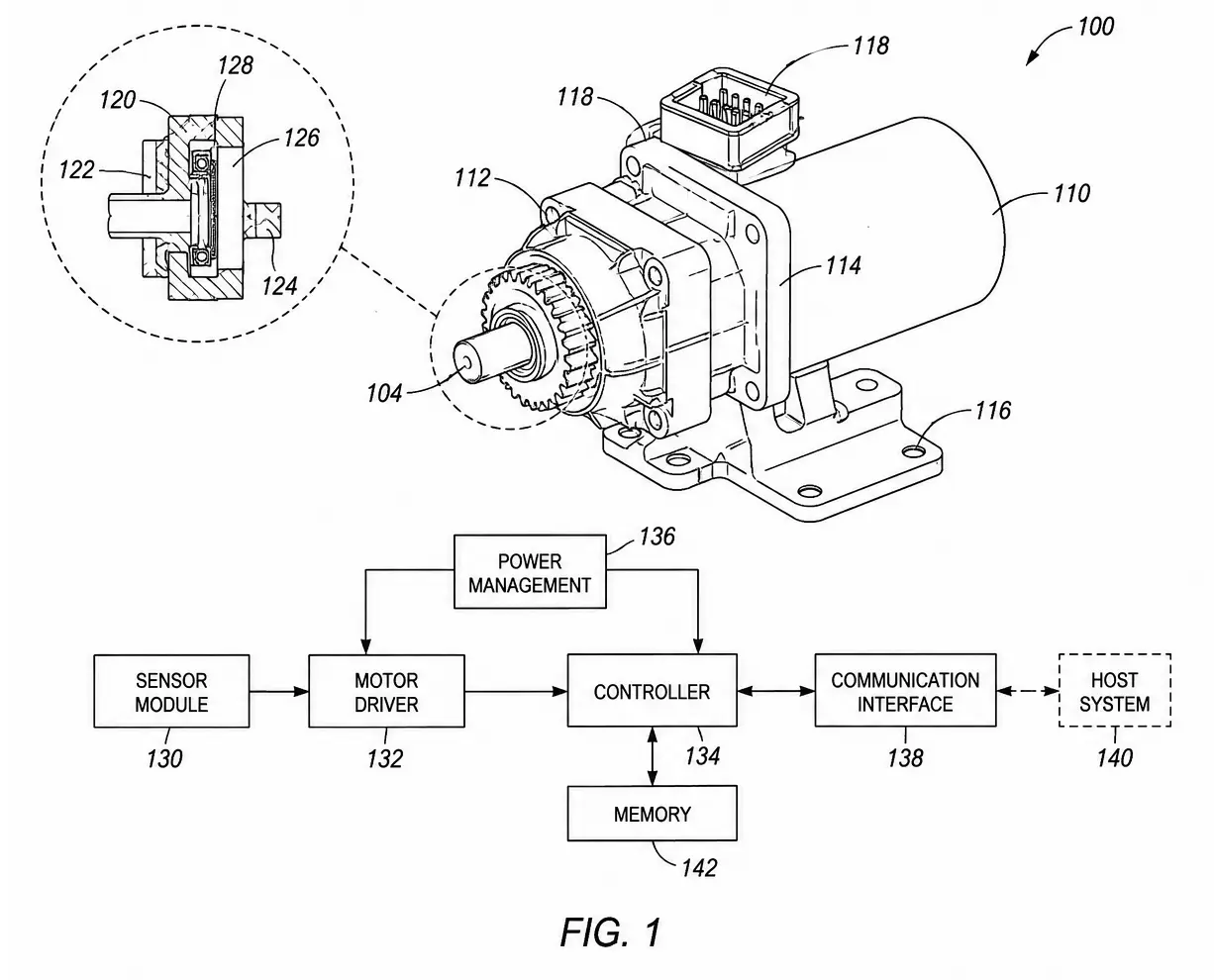
Patent figure example showing a technical invention with numbered reference elements

For research and invention disclosure

Explore Illustrate Document Communicate

A Changing Research Environment

Research value also depends on how clearly you can communicate it.

AI may accelerate some research and communication tasks, raising expectations for productivity. Researchers still need to explain complex technical concepts to collaborators, reviewers and technology transfer professionals.

A flexible visual environment can help researchers prepare conceptual diagrams and invention disclosures without unnecessary dependence on specialized drawing assistance. This complements, rather than replaces, scientific visualization and discipline-specific tools.

01 The Challenge

Technical ideas can be difficult to communicate.

  • Competing demands on research time
  • Complex structures and relationships
  • Repeated explanation across disciplines
  • Limited access to drawing support
The Opportunity Build an independent visual communication capability
02 A Practical Research Skill

Work with editable illustrations as ideas evolve.

  • Visualize concepts and technical systems
  • Explain methods and processes
  • Document potential inventions
  • Collaborate with technology transfer teams

From Research Concept to Invention Disclosure

Develop practical visual capabilities for research and innovation.

Clear visual material can help you explain how technical elements relate, how an experimental method works and what distinguishes a potential invention.

Begin with conceptual and invention-related illustrations. Continue to use appropriate research tools for quantitative figures, data analysis and scientific validation.

01 Visualize

Explore and communicate technical concepts.

Create simple conceptual diagrams of structures, mechanisms or system relationships for discussion with colleagues.

Conceptual diagrams Relationships Structures
02 Illustrate

Explain methods and technical workflows.

Use reusable diagram resources to show process steps, experimental arrangements or functional relationships without rebuilding routine elements each time.

Methods Process flows Technical diagrams
03 Document

Capture possible inventions visually.

Organize sketches and other approved source material to clarify the invention, its operation and possible variations before disclosure discussions.

Invention disclosures Source material Variants
04 Refine

Keep illustrations editable as your research develops.

Adjust layouts, update relationships and prepare alternative views in a practical drawing environment. Distinguish conceptual illustrations from empirical evidence.

Editable diagrams Revisions Alternative views
05 Communicate

Improve collaboration with technology transfer and counsel.

Share authorized visual material that helps explain the invention. Coordinate public disclosure, confidential information and patent decisions with the appropriate university office.

Collaborators TTO teams Patent counsel

The Principle

Build useful skills while respecting research integrity.

Use practical drawing methods for conceptual and invention-related illustration; use appropriate scientific tools for data and professional drawing services where needed.

Patent Figure System™ Practical visualization capability
or
IP DaVinci Studio Professional drawing services

The IP DaVinci Patent Figure System™

Develop a visual skill set you can reuse throughout your research.

The System combines Training, the Patent Figure Toolkit™ and Support to help researchers learn practical methods and use editable Visio resources for invention-related illustrations.

Start with a nonconfidential concept or approved disclosure example, and apply the methods where they fit your research workflow.

01 Learn & Develop

Training

Learn practical patent-figure skills and standardized methods through the Learning Portal and Live Training.

Patent Figure Standards Visio Skills for Patent Figures Patent Figure Creation Methods Other Patent Figure Methods
02 Work

Patent Figure Toolkit™

Apply the methods using reusable resources designed for practical patent-figure work in Microsoft Visio.

Templates Stencils Productivity Resources
03 Get Help

Support

Get guidance when applying the System to real patent-figure tasks.

Live Clinics One-on-One Support Practical Workflow Guidance
One Connected System
Training Patent Figure Toolkit™ Support Clearer technical and invention communication
Available Today & Future Direction

Microsoft Visio is the currently supported drawing environment.

The current offer is Visio-based tools, methods, training and support. Our development direction is to evaluate AI-assisted drawing and other visualization environments, and incorporate proven methods when appropriate. Integrated AI drawing features are not part of the current evaluation.

IP DaVinci for University Researchers

Give your technical ideas a clearer visual form.

Evaluate the current Visio-based System on an approved conceptual diagram or invention-related illustration. Use Studio services when specialized patent drawing production is required.

Start Small
One concept. One method diagram. One invention disclosure.

Choose an approved example and assess whether the visual material makes technical communication easier.

Patent Figure System™ Develop practical visualization skills.
IP DaVinci Studio Access professional illustrations.
Research Communication Explain inventions more effectively.