IP DaVinci Studio

Professional patent figures when you need them.

Bring us the source material, revisions, or complex figure work that needs professional attention. IP DaVinci Studio provides experienced patent drawing support while keeping your figures editable and your workflow moving.

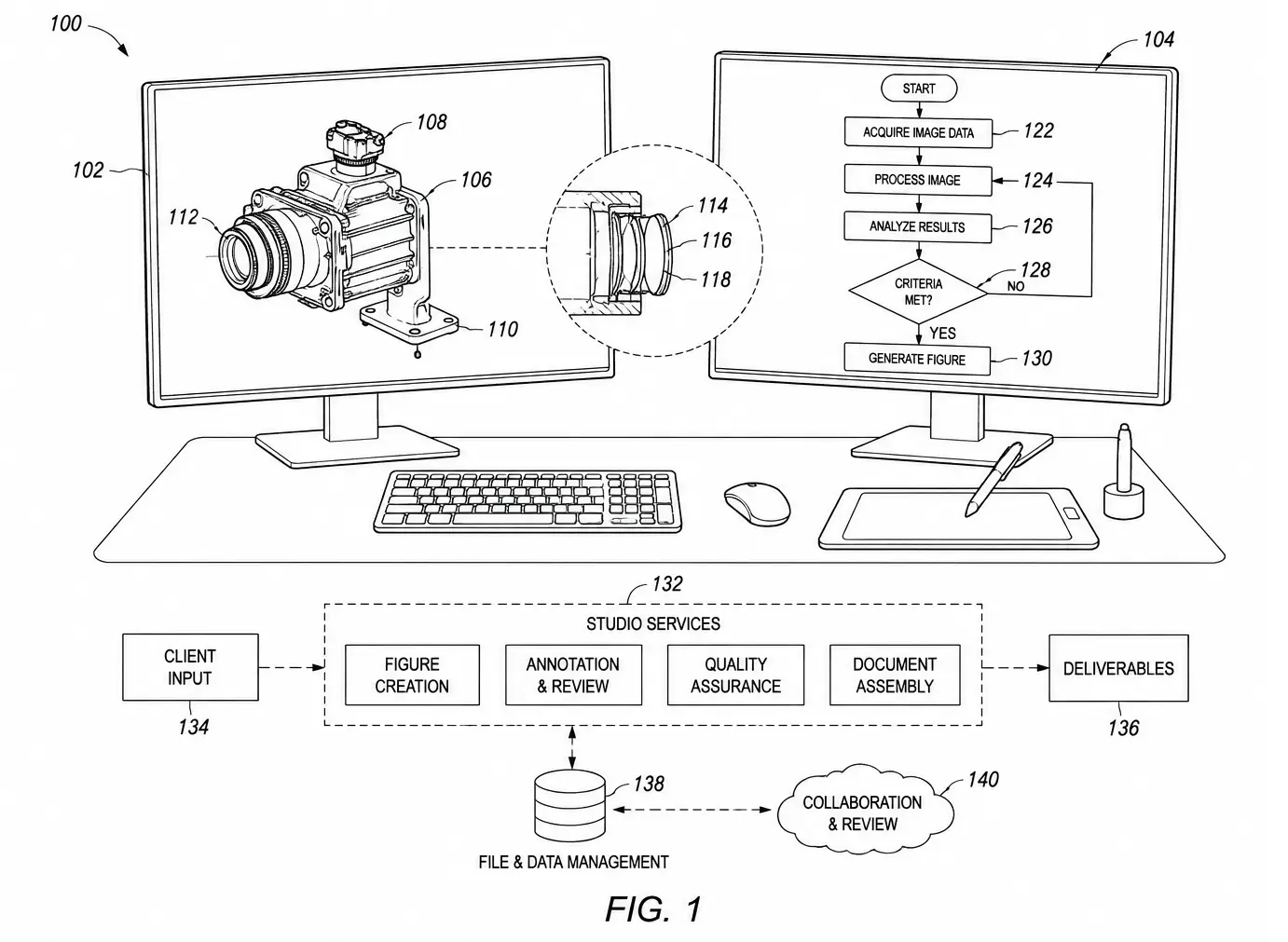
Professional patent drawing example representing IP DaVinci Studio services

Professional support

New Figures Revisions Image Tracing Complex Figure Work

When the Work Needs More

Not every patent figure should be handled the same way.

Some figure work is practical to review, revise, or create internally. Other work calls for experienced professional drafting.

IP DaVinci Studio gives organizations and individuals a professional resource for the work they do not want to handle themselves—or should not have to.

01 Internal Capability

Handle appropriate work directly.

With the right skills and tools, many routine patent-figure tasks can be reviewed, revised, communicated, or created by the people already involved in the patent work.

Examples
  • Reviewing figure content
  • Making routine revisions
  • Adjusting labels and reference numbers
  • Developing straightforward figures
  • Collaborating around editable drawings
Use the right resource
02 IP DaVinci Studio

Escalate work that needs professional drafting.

When a figure is more complex, specialized, time-sensitive, or simply better handled by an experienced patent drawing professional, Studio provides the next level of support.

Examples
  • Complex technical figures
  • Difficult source material
  • Larger figure sets
  • Drawing formalization
  • Work requiring experienced drafting judgment
The Principle

Build internal capability for the work that makes sense to handle internally. Use professional drafting when professional drafting is the better choice.

A more flexible model

The choice does not have to be internal or outsourced.

Traditional patent-figure workflows often force a simple choice: do the work internally or send it to a drafting provider.

IP DaVinci creates a more flexible model. Your team can develop greater capability and control while still having professional drafting available when the work calls for it.

Review Understand the work
Decide Choose the right path
Handle Work internally when appropriate
Escalate Move the work to Studio

IP DaVinci Studio

Professional patent drawing support when the work needs more than your internal workflow should provide.

What Studio Does

Professional patent drawing support from source material to finished figures.

Patent-figure work rarely begins with a perfect drawing.

Studio can work from existing figures, sketches, photographs, screenshots, PDFs, CAD exports, technical documents, and other source material to develop clean, consistent patent figures for the matter at hand.

01 Formalize

Turn rough material into clean patent figures.

Convert inventor sketches, working drawings, existing graphics, and other informal material into consistent line drawings suitable for patent-figure workflows.

Typical source material

Sketches · rough drawings · existing graphics · annotated concepts

02 Trace & Convert

Convert visual source material into editable line work.

Reconstruct useful technical information from raster images and other non-editable sources as clean vector line drawings that can be refined and annotated.

Typical source material

Photographs · screenshots · scans · PDFs · image-based drawings

03 Create

Develop new figures from technical information.

Build patent figures from technical concepts, source documents, inventor materials, and instructions when a usable figure does not yet exist.

Typical work

Technical diagrams · system figures · process figures · component views

04 Revise

Revise and refine existing patent figures.

Update existing drawings when figures need substantive changes, cleanup, added elements, corrected references, or broader reworking.

Typical work

Figure changes · added elements · reference updates · cleanup · restructuring

05 Complex Work

Handle figures that need experienced drafting judgment.

Some source material or figure requirements are simply too involved for routine internal production. Studio provides experienced drafting support for those cases.

Typical situations

Dense technical material · difficult source files · extensive detail · specialized views

06 Complete Sets

Develop and coordinate complete figure sets.

Studio can support an individual drawing or take on a broader figure set where consistency across multiple figures, views, labels, and reference elements matters.

Typical scope

Multiple figures · coordinated views · reference consistency · complete drawing packages

Start With What You Have

Source material does not need to be drawing-ready.

The purpose of Studio is to bridge the gap between technical information and professional patent figures. Send the material that best communicates the invention or requested change.

01 Inventor sketches
02 Photographs
03 Screenshots
04 PDFs
05 CAD exports
06 Existing patent figures
07 Technical documents
08 Marked-up drawings

From Source to Figure

The starting material changes. The objective stays consistent.

Source Technical material
Interpret Understand what must be shown
Develop Build the drawing
Refine Review and revise
Deliver Finished figures

Built for continued work

The drawing should remain useful after Studio finishes it.

Wherever the workflow permits, Studio work is developed with continued revision and collaboration in mind—not simply as a static image that becomes difficult to change.

That matters when attorneys, inventors, engineers, support professionals, or Studio itself need to return to the figure later in the patent process.

Studio Principle

Start with the technical information you have. Studio helps turn it into the patent figures you need.

Different work requires different approaches

The right drafting method depends on what needs to be communicated, the source material available, and the figures required for the matter.

Types of Figure Work

Different inventions call for different ways of showing them.

Patent figures can communicate physical structure, system relationships, processes, interfaces, scientific concepts, and many other forms of technical information.

Studio adapts the drawing approach to the invention, the available source material, and what the figures need to communicate.

01 Physical Structure

Mechanical & Structural Figures

Figures showing physical products, assemblies, components, mechanisms, and relationships between structural elements.

Examples

Perspective views · component views · assemblies · sectional views · exploded relationships

02 Systems

Electrical & System Figures

Diagrams that communicate functional components, system architecture, connections, relationships, and technical interaction between elements.

Examples

Block diagrams · system architecture · electrical relationships · network diagrams · component systems

03 Processes

Flowcharts & Process Figures

Figures used to communicate sequences, methods, decision paths, operations, processing stages, and other procedural relationships.

Examples

Flowcharts · process diagrams · method sequences · decision paths · operational workflows

04 Digital Systems

Software & Interface Figures

Figures that help communicate software behavior, digital environments, interface relationships, screen arrangements, and user interactions.

Examples

Interface diagrams · screen representations · software architecture · interaction flows · application relationships

05 Scientific

Scientific & Technical Figures

Technical illustrations and diagrams used where scientific, laboratory, medical, material, or other specialized subject matter must be communicated visually.

Examples

Laboratory systems · technical apparatus · scientific diagrams · specialized equipment · conceptual figures

06 Source Conversion

Source-Based & Traced Figures

Figures developed from visual source material when the technical information already exists but needs to be reconstructed as clean line work.

Examples

Photographs · screenshots · scans · CAD exports · PDFs · existing raster artwork

One Matter, Multiple Figure Types

A patent application rarely has to fit one drawing category.

A single matter may combine structural drawings, system diagrams, flowcharts, interface figures, source-based illustrations, and other forms of technical communication.

Studio can work across the figure set so that different types of drawings still function as part of one coordinated visual package.

Example Figure Mix

The figure set follows the invention.

FIG. 1 System Overview
FIG. 2 Component Detail
FIG. 3 Process Flow
FIG. 4 Interface View
FIG. 5 Additional Detail
Drawing Approach

The goal is not to force every invention into the same visual style. The goal is to choose a clear drawing approach for the technical information that needs to be communicated.

Have Something Different?

These categories are examples, not limits.

Patent matters vary widely. If your figures do not fit neatly into one of these categories, Studio can review the source material and determine an appropriate drawing approach.

From figure type to finished work

Once the scope is understood, Studio moves the work through a practical drafting, review, and revision process.

How Studio Works

Start with the patent-figure work in front of you.

You do not need to turn your source material into a perfect drafting package before sending it to Studio.

Share the material, instructions, existing figures, and context you have. We review the work, establish the appropriate scope, and move it through drafting, review, revision, and delivery.

01 Send

Send what you have.

Start with the material that best communicates the invention, existing figure, requested change, or drawing problem.

This might include

Sketches · photographs · screenshots · PDFs · CAD exports · existing figures · markups · technical documents

02 Review

We review the figure work.

Studio examines the available material, the requested work, and the relationship between the source material and the figures that need to be developed or changed.

The objective

Understand what exists, what needs to change, and what the drawing work requires.

03 Scope

Establish the right scope.

We determine the figure work required and identify any additional information or clarification needed before drafting proceeds.

Scope may cover

One revision · one new figure · several figures · source conversion · a complete figure set

04 Draft

Develop the figures.

Studio creates, formalizes, converts, or revises the drawings according to the agreed scope and the technical information provided.

During drafting

Structure · line work · views · relationships · labels · reference characters · consistency

05 Review & Revise

Review the work together.

Your team reviews the figures and communicates corrections, technical changes, or other requested revisions before the work is finalized.

Collaboration may involve

Attorneys · patent agents · inventors · engineers · paralegals · patent support professionals

06 Deliver

Complete the figure work.

Once the requested revisions are resolved, Studio prepares the completed figure work for delivery and continued use in your patent workflow.

Result

A coordinated set of completed patent figures based on the agreed scope.

01 Send
02 Review
03 Scope
04 Draft
05 Revise
06 Deliver

Start Before Everything Is Perfect

A complete drafting brief is helpful. It is not required to begin the conversation.

Patent-figure work often develops while attorneys, inventors, engineers, and other participants are still refining how the invention should be communicated.

If the source material is incomplete, inconsistent, or difficult to interpret, Studio can review what exists and identify what additional information would help move the drawing work forward.

Revision Is Part of the Work

Patent figures develop through communication.

Draft Studio develops the figure
Review Your team reviews the work
Clarify Changes are communicated
Revise Studio updates the figure

The objective is a practical revision process in which technical changes can be understood and incorporated without unnecessary friction.

Work With the People Who Know the Matter

Figure communication does not have to pass through one person.

Patent Attorneys
Patent Agents
Technical Inventors
Technical Engineers
Practice Paralegals
Practice Support Teams
Studio Workflow

Start with what you have. Clarify what the figures need. Develop the work together.

Studio is only one part of the model

Professional drafting becomes even more useful when your team also has the capability to review, revise, and collaborate around patent figures directly.

Studio + System

Build capability internally. Escalate selectively.

Professional drafting and internal patent-figure capability do not have to compete with each other.

The IP DaVinci model gives your team practical capability for the figure work that makes sense to handle internally, while Studio remains available when the work requires more time, complexity, experience, or drafting support.

01 Internal Capability

IP DaVinci Patent Figure System™

Give your team the ability to work directly with patent figures.

The System provides practical skills, tools, workflows, and support for creating, reviewing, revising, and collaborating around patent figures in Microsoft Visio.

01 Review figures
02 Make routine revisions
03 Develop figures internally
04 Collaborate around editable drawings
02 Professional Drafting

IP DaVinci Studio

Bring in professional drafting when the work calls for it.

Studio provides an escalation path for work that benefits from experienced drafting—without requiring every figure task to leave your organization.

01 Complex figure work
02 Source conversion & tracing
03 Complete figure sets
04 Overflow & specialized support

A Practical Division of Work

Not every figure task needs the same resource.

The objective is not to move all drafting inside or send all drafting outside. It is to give your team better choices about where the work should happen.

Handle Internally When your team has the capability
01

Reviewing incoming figures

02

Simple figure revisions

03

Reference-character changes

04

Basic diagrams and flowcharts

05

Inventor collaboration

06

Routine figure development

Escalate to Studio When professional drafting adds value
01

Complex technical figures

02

Difficult source material

03

Extensive tracing or formalization

04

Large or coordinated figure sets

05

Specialized drawing requirements

06

Capacity or deadline pressure

The Escalation Model

Keep routine work close. Escalate when the work gets harder.

Your Team Review & work directly
Evaluate Routine or complex?
Routine Continue internally
Complex Escalate to Studio

A Shared Way of Working

Internal capability makes professional drafting easier to work with.

When your team understands patent-figure workflows and can work directly with editable drawings, the relationship with professional drafting changes.

Attorneys, agents, inventors, engineers, and support professionals can review figures more directly, communicate changes more clearly, and handle appropriate revisions without turning every adjustment into a separate drafting request.

Use What You Need

Studio can stand alone or work alongside the System.

01

Studio

Professional drafting only

Send figure work to Studio when you need professional drawing support.

02

System

Internal capability

Equip your team to create, review, revise, and manage appropriate figure work internally.

The IP DaVinci Model

The goal is not to eliminate professional drafting. It is to use professional drafting where it adds the most value.

Build Internal Capability

See the IP DaVinci Patent Figure System™.

Explore the skills, tools, workflows, and support designed to help organizations work more effectively with patent figures internally.

Patent figures are collaborative work

Studio can work with the people who understand the legal, technical, and practical requirements of the matter.

Working With Your Team

Keep the people who understand the matter close to the figures.

Patent figures sit between legal requirements, technical knowledge, and visual communication.

Studio can work with the attorneys, patent agents, inventors, engineers, paralegals, and support professionals involved in the matter so questions and revisions can be communicated clearly.

01 Legal

Attorneys & Patent Agents

Communicate what the figures need to show, how they relate to the application, and what changes are needed as the matter develops.

Typical collaboration

Figure scope · views · reference characters · revisions · figure relationships · prosecution changes

02 Technical

Inventors & Engineers

Clarify how the invention works, explain source material, identify technical relationships, and help resolve questions that arise during drafting.

Typical collaboration

Sketches · photographs · CAD · components · technical relationships · operational details

03 Coordination

Paralegals & Support Professionals

Help coordinate source material, figure sets, instructions, revisions, and communication as drawing work moves through the patent workflow.

Typical collaboration

Files · instructions · markups · figure versions · revision coordination · completed work

One Figure, Multiple Perspectives

The drawing becomes the common point of communication.

Legal What needs to be shown?
Technical How does it actually work?
Figure Make it visible
Review Is it communicated correctly?
Revision Refine the figure

Clearer Communication

Reduce the translation between technical knowledge and drawing instructions.

Drawing revisions become harder when every technical question must pass through several layers before it reaches the person doing the figure work.

When appropriate, Studio can collaborate with the people who know the matter so technical questions, visual changes, and drafting instructions can be understood more directly.

Collaborative Patent-Figure Work
Your Team Legal + technical knowledge
Studio Patent drawing capability
Figure Work Clearer visual communication
The Principle

The closer the drawing process stays to the people who understand the invention, the easier it is to communicate what the figures need to show.

Clear communication still needs disciplined execution

Studio applies consistent drawing practices as figure work moves from source material to completed patent drawings.

Professional Drawing Standards

Patent figures need more than clean lines.

Effective patent drawings depend on clarity, consistency, and disciplined visual execution.

Studio applies established patent-drawing practices throughout the figure set while adapting the work to the invention, source material, and requirements of the matter.

01 Structure

Clear figure organization

Views, components, relationships, and supporting elements are organized so the drawing communicates the subject matter clearly.

02 Line Work

Consistent visual treatment

Lines, shapes, connectors, boundaries, and other drawing elements are developed with a consistent visual language across the figure work.

03 References

Coordinated reference characters

Reference characters are placed and managed consistently so elements can be identified clearly throughout individual figures and across the set.

04 Legibility

Readable at practical scale

Labels, reference characters, line relationships, spacing, and detail are considered together so figures remain understandable when viewed and reproduced.

05 Consistency

One coordinated figure set

Related figures are treated as part of the same visual system rather than as isolated drawings, helping maintain consistency from figure to figure.

06 Editability

Drawings built for revision

Where the workflow calls for editable source files, figure elements are structured so future changes can be made without unnecessarily rebuilding the drawing.

Details Matter

Small inconsistencies become larger problems across a figure set.

01

Line weights and drawing treatment

02

Reference-character placement

03

Text size and visual hierarchy

04

Spacing and component relationships

05

Figure numbering and organization

06

Consistency between related views

07

Appropriate use of broken and solid lines

08

Overall readability of the drawing

From Source Material to Patent Figure

Formalization is part of the drawing work.

Source material often contains more visual information than belongs in the final patent figure. Studio interprets that material and develops a cleaner drawing appropriate to the required figure.

Source Photo · sketch · CAD · screenshot
Interpret Identify relevant visual information
Formalize Develop structured line work
Figure Clear patent drawing

Across the Figure Set

Each drawing should belong to the same visual system.

Patent applications frequently contain multiple related figures. Changes to one view can affect reference characters, components, labels, and relationships elsewhere in the set.

Studio treats the drawings as a coordinated body of work so changes can be considered in the context of the complete figure set.

Drawing Discipline
Clear Easy to interpret
Consistent Coordinated across figures
Editable Practical to revise
Professional Disciplined figure work

Matter-Specific Requirements

Drawing requirements depend on the application and filing context.

Patent-office requirements, application strategy, jurisdiction, and the subject matter of the invention can affect how particular figures should be prepared.

Studio works from the requirements and instructions applicable to the matter rather than treating every patent drawing as an identical production task.

Studio Standard

Clear enough to communicate the invention. Consistent enough to work as a set. Structured enough to revise when the matter changes.

Use Studio where it fits your workflow

Professional drafting can support a single matter, difficult figure work, overflow capacity, or an ongoing patent-figure workflow.

Ways to Use Studio

Use professional drafting where it fits your workflow.

Studio does not require one fixed way of working.

Bring us a single matter, difficult figure work, additional capacity, recurring drafting needs, or work that your internal team decides should be escalated.

01 Project

A single patent matter

Use Studio when you have a specific application, figure set, drawing revision, or other patent-figure project that needs professional drafting support.

Useful when

You have defined figure work and simply need an experienced drafting resource to complete it.

02 Complexity

Difficult or specialized figure work

Escalate work that requires more drawing experience, interpretation, formalization, tracing, coordination, or time than makes sense to handle internally.

Useful when

The source material or figure requirements exceed the practical limits of your internal workflow.

03 Capacity

Overflow drafting capacity

Keep work moving when internal teams or existing drafting resources are busy, deadlines converge, or temporary additional capacity is needed.

Useful when

You already have a working process but need another capable drafting resource available.

04 Ongoing

Recurring drafting support

Use Studio across multiple matters when your organization regularly needs professional patent-figure support but does not need to build every drafting capability internally.

Useful when

Patent drawing work is recurring and you value continuity in how figures are developed and revised.

Choose Based on the Work

The right resource can change from matter to matter.

Routine Handle internally

When your team has the capability and the work is practical to complete directly.

Complex Escalate to Studio

When the drawing requires additional experience, interpretation, or drafting effort.

Capacity Add Studio support

When the work is manageable but your available resources or schedule are not.

Collaborative Work together

When your team should remain directly involved while Studio performs the drafting work.

Start With the Work in Front of You

You do not need to design a long-term Studio program before working with us.

A Studio relationship can begin with one drawing, one figure set, one application, or one difficult project.

If recurring needs develop, Studio can become a more regular part of your patent-figure workflow.

A Simple Starting Point
01 Have figure work
02 Send what you have
03 Review the scope
04 Move forward
Flexible by Design

Use Studio for the work that benefits from professional drafting—whether that is one figure today or an ongoing part of your patent workflow.

Have patent-figure work in front of you?

Start with the project you have now.

IP DaVinci Studio

Have patent-figure work in front of you?

Start with what you have.

Send us your sketches, photographs, screenshots, CAD exports, existing figures, markups, or other source material. We can review the work, understand what you need, and determine the right next step.

A Simple Starting Point

01
Show us the work

Share the source material, existing figures, or drawing problem you are working with.

02
Tell us what you need

Explain the matter, desired figures, revisions, timing, or other requirements that are important.

03
We review the scope

We determine how Studio can support the work and what makes sense as the next step.

Studio or System?
Need the drawings done? Use Studio.
or
Want more capability inside your team? Explore the Patent Figure System™.

Professional patent drawing support when you need it. Internal patent-figure capability when you want it.