01
Learn
Training
Develop practical patent-figure knowledge and skills through structured Learning Portal courses and instructor-led IP DaVinci Live Training.
Standards
Visio Skills
Figure Methods
Other Methods
Explore Training
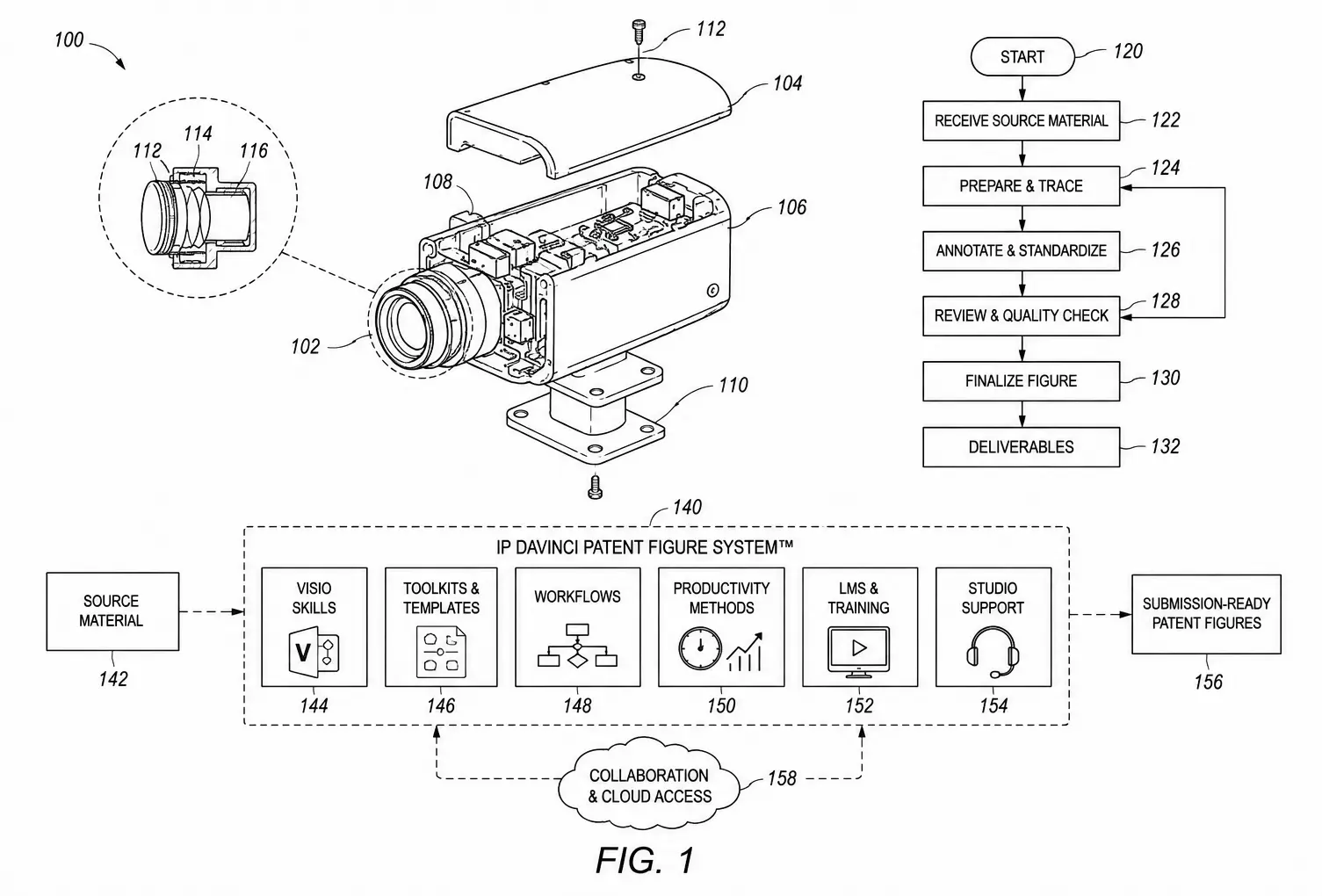
IP DaVinci Patent Figure System™
A practical system of training, purpose-built Microsoft Visio resources, and ongoing support that helps people create, review, revise, collaborate on, and manage utility patent figures more effectively.
The System
What the System Is
Patent figures sit at the intersection of technical knowledge, patent preparation, drawing standards, and visual communication. Yet the people working with them are rarely given a complete environment for developing and applying practical figure capability.
The IP DaVinci Patent Figure System™ brings together Training, the Patent Figure Toolkit™, and Support so patent professionals, inventors, engineers, researchers, support teams, and other users can work with utility patent figures more confidently and consistently.
Microsoft Visio serves as the primary drawing environment. IP DaVinci teaches users how to work effectively in that environment, provides purpose-built resources for the work, and keeps additional help available when it is needed.
Not simply
A generic Microsoft Visio course
A collection of templates and stencils
A traditional patent drawing service
A requirement to handle every drawing internally
Instead
A structured way to develop the right level of patent-figure capability for the people who need it.
Training develops the capability. The Patent Figure Toolkit™ helps users apply it in Microsoft Visio. Support remains available whenever additional guidance or professional assistance is needed.
The System
Practical capability requires more than learning software. People need a way to develop the relevant knowledge and skills, resources that make the work easier to perform, and help when questions or more demanding projects arise.
IP DaVinci organizes those needs into three connected parts.
Develop practical patent-figure knowledge and skills through structured Learning Portal courses and instructor-led IP DaVinci Live Training.
Start with purpose-built Microsoft Visio templates, stencils, and productivity resources designed around recurring patent-figure work.
Use Live Clinics, one-on-one assistance, and IP DaVinci Studio when a question, problem, or project requires additional help.
How the System works
Part 01 — Training
Training is the capability-building part of IP DaVinci.
Users develop the knowledge and practical skills needed for utility patent figure work through structured Learning Portal courses and instructor-led Live Training. The goal is not to learn everything at once, but to build useful capability and continue developing it as new needs arise.
Understand the standards, conventions, terminology, and quality considerations behind utility patent figures.
Learn the Microsoft Visio techniques that matter specifically for creating, reviewing, revising, and managing patent figures.
Apply patent standards and Visio skills to recurring types of utility patent figure work.
Continue developing techniques that cut across individual figure types and recurring patent-figure situations.
Two ways to learn
The Learning Portal provides structured courses, lessons, demonstrations, reference materials, and practice resources. IP DaVinci Live Training adds instructor-led explanation, demonstration, interaction, and practical application.
The goal
Build the level of patent-figure knowledge and practical skill that makes sense for the work you want to perform.
Part 02 — Patent Figure Toolkit™
Knowing how to work in Visio is only part of the equation. The working resources matter too.
The Patent Figure Toolkit™ provides purpose-built Microsoft Visio templates, stencils, and productivity resources so common patent-figure work does not have to begin from a blank page.
Begin with prepared Visio pages, settings, and drawing environments designed for patent-figure work instead of configuring common requirements repeatedly.
Keep frequently used patent-figure shapes and drawing elements organized and available for direct reuse inside the Microsoft Visio workspace.
Use prepared resources that support recurring figure tasks, consistent working methods, reuse, and more efficient patent-figure production.
The practical difference
Configure, locate, rebuild, and organize the pieces needed for the task.
Start with prepared templates, reusable shapes, and patent-specific resources.
Spend more time on what the drawing needs to communicate and less time rebuilding the setup.
Built around editability
The Toolkit supports an editable Visio-based workflow, making it easier to revise figures, reuse drawing elements, respond to changes, and continue working with the source drawing as the patent work evolves.
The goal
Give users a practical starting point for patent-figure work instead of asking them to build their working environment from scratch.
Your Working Environment
Microsoft Visio is the primary drawing environment used with IP DaVinci—not a separate part of the System.
Training teaches users how to work effectively in Visio for patent figures. The Patent Figure Toolkit™ adds purpose-built resources to that environment. Support is available whenever questions, problems, or more complex work arise.
Create utility patent figures using drawing geometry, connectors, text, images, pages, layers, and other Microsoft Visio capabilities.
Review editable figure elements directly, understand how they are constructed, and identify changes more clearly.
Update geometry, annotations, reference numbers, layouts, and other drawing elements while preserving an editable working file.
Use editable drawings to support review and iteration among attorneys, agents, inventors, engineers, researchers, support staff, and other participants.
How IP DaVinci fits
IP DaVinci does not replace Microsoft Visio. It provides the patent-figure knowledge, prepared resources, and support that make Visio a more practical working environment for utility patent figure work.
The goal
Turn Microsoft Visio into a practical working environment for the patent-figure tasks you need to perform.
Part 03 — Support
Building internal capability does not mean working alone or handling every patent-figure situation yourself.
IP DaVinci provides multiple levels of support so users can get practical help with questions, problems, and projects while continuing to build their own capability over time.
Use IP DaVinci Live Clinics when a drawing question, Visio problem, Toolkit issue, or practical figure situation would benefit from interactive help.
Use focused individual support when a question or working situation is better addressed directly than in a group training or clinic environment.
When the work requires specialized drafting expertise, additional production capacity, or professional patent drawing assistance, IP DaVinci Studio can handle the work.
Support without dependency
Some questions can be solved through training. Some are easier to work through live. Some projects are better handled with focused assistance or professional drafting.
The System gives users a path to keep moving without requiring every patent-figure need to be handled the same way.
Different users. Different needs.
Understand figures well enough to review work and communicate changes more clearly.
Handle appropriate routine changes directly when that is the practical choice.
Develop greater capability for producing appropriate figures from technical source material.
Use support or professional drafting whenever the work goes beyond the capability you want to maintain yourself.
Internal capability does not mean doing everything internally
Some figure work makes sense to review, revise, or create directly. Other work may call for an experienced patent drawing professional.
The objective is greater capability, control, and flexibility while keeping professional assistance available whenever it adds value.
The goal
Build useful capability without requiring users to solve every patent-figure problem by themselves.
How the System Works Together
The three parts of IP DaVinci are designed to support the same practical objective: useful patent-figure capability.
Users can learn what they need, apply those skills in Microsoft Visio using prepared Toolkit resources, and use Support whenever additional guidance or professional assistance is appropriate.
Build patent-figure knowledge, Visio skills, and practical figure methods through self-paced and live training.
TrainingUse prepared templates, stencils, and productivity resources while creating, reviewing, and revising figures.
Patent Figure Toolkit™Bring questions to a Live Clinic, use one-on-one support, or move appropriate work to IP DaVinci Studio.
SupportThe Result
Users do not have to choose between doing everything themselves and sending everything elsewhere. They gain practical capability for appropriate work and retain access to help when the situation requires it.
Capability grows through use
Training, Toolkit resources, and Support remain available as new patent-figure situations arise.
Organizational Implementation
Implementing IP DaVinci does not require rebuilding your entire patent workflow.
Organizations can begin with a focused group, establish useful patent-figure capability around real work, and expand the System as the appropriate roles and use cases become clear.
Identify how patent figures are currently created, reviewed, revised, exchanged, and supported—and where greater practical capability could be useful.
Introduce the System where it can solve an identifiable problem rather than trying to change every figure process across the organization at once.
Give selected users access to the learning, working resources, and support they need to begin developing and applying patent-figure capability.
Add people, teams, training areas, or additional use cases as the organization learns where patent-figure capability creates the most practical value.
A focused starting point
A practical implementation can begin with a small group of people who regularly encounter patent-figure work and have clear opportunities to use the capability.
Choose people whose roles give them practical opportunities to review, revise, create, or coordinate patent figures.
Focus on recurring figure tasks where improved capability can make work easier or communication clearer.
Apply the System to actual work and use those experiences to determine where capability should develop next.
One system. Different environments.
The core System remains consistent, but the people, training priorities, use cases, and support needs can differ depending on the organization.
Law Firms
Attorneys, patent agents, paralegals, and support professionals can develop different levels of capability around review, revision, creation, and collaboration.
Explore Law FirmsCorporate IP & R&D
IP teams, inventors, engineers, and outside counsel can work more effectively around technical source material and editable patent figures.
Explore CorporationsUniversities
Technology-transfer teams, researchers, faculty, students, and inventors can develop capability appropriate to their role.
Explore UniversitiesAssociations
Associations can use IP DaVinci as an educational program, recurring member resource, or broader professional capability benefit.
Explore AssociationsExpand based on evidence
An initial implementation creates an opportunity to see which people use the System, which figure tasks benefit most, and where additional capability would be valuable.
Support remains available
The System helps organizations develop practical patent-figure capability, but it does not require every drawing to stay internal.
Live Clinics and one-on-one support can help users keep moving, while more complex, specialized, or production- intensive work can be handled through IP DaVinci Studio or other professional drafting resources.
Explore IP DaVinci StudioStart with a real need. Build useful capability. Expand where it proves valuable.
The goal
Introduce patent-figure capability without creating another large implementation project.
Ways to Start
You do not need a large implementation to begin building patent-figure capability.
Start as an individual, introduce the System to a team or organization, or begin with a focused assessment and pilot to determine where the capability can create the most practical value.
Individual Access
For patent professionals, inventors, engineers, researchers, educators, and others who want direct access to IP DaVinci for their own patent-figure work.
Organizational Capability
For law firms, corporations, universities, associations, and other organizations that want to give selected people a consistent system for working with patent figures.
Capability Assessment & Pilot
For organizations that want to understand their current patent-figure workflow, identify useful starting points, and test the System with a focused group or use case.
Not sure where to begin?
Organizational Solutions
Partnerships & Special Programs
IP DaVinci can also support association programs, client-benefit programs, educational initiatives, strategic partnerships, and other arrangements where patent-figure capability is being extended to a broader professional community.
Discuss a PartnershipStart with the people and patent-figure work where capability can be useful now. Expand from there.
IP DaVinci Patent Figure System™
Give the people involved in patent work the training, tools, and support to create, review, revise, collaborate on, and manage patent figures more effectively in Microsoft Visio.
Explore how IP DaVinci could fit your current patent-figure workflow and where it makes sense to begin.
Get direct access to Training, Patent Figure Toolkit resources, and available Support for your own patent-figure work and professional development.
Learn what you need. Work with purpose-built resources. Get help when you need it.